
Welcome to Tapicker v5.20.8! This update brings major improvements to the workflow execution engine and editor experience, along with human-like cursor movement, more flexible Conditions, multi-select support, and more.
- Improved the workflow execution engine
- Improved the editor experience
- Added simulated cursor movement
- Added support for clearing variables
- Improved rendering for different data types
- Condition now supports Else
- Select Option now supports multiple selections
- Fixed an issue where Finder couldn't select elements in Pinterest modals
- Fixed Inspector display issues in iframes
- Breaking changes
Improved the workflow execution engine
This is one of the most important upgrades in this release! We've made significant improvements to the execution engine to make workflows more stable, responsive, and easier to debug:
- Handled various edge cases to improve execution stability
- Added clearer error messages to logs for easier debugging
- Improved responsiveness to control signals during long-running tasks
- Added fallback strategies for hidden pages to prevent workflows from getting stuck
Improved the editor experience
This is another major upgrade in this release! We've refined the editor to make building and managing workflows smoother and more intuitive:
- Shows the currently connected tab
- Supports selecting multiple Blocks at once
- Added more comprehensive keyboard shortcuts
- Displays more contextual help and guidance
Added simulated cursor movement
Tapicker can now simulate moving the cursor to a target element before performing an interaction, such as clicking an element or pressing a button.
To enable it:
- In
Scriptmode, enableSimulate human behavior - In
Debuggermode, it is enabled by default
Added support for clearing variables
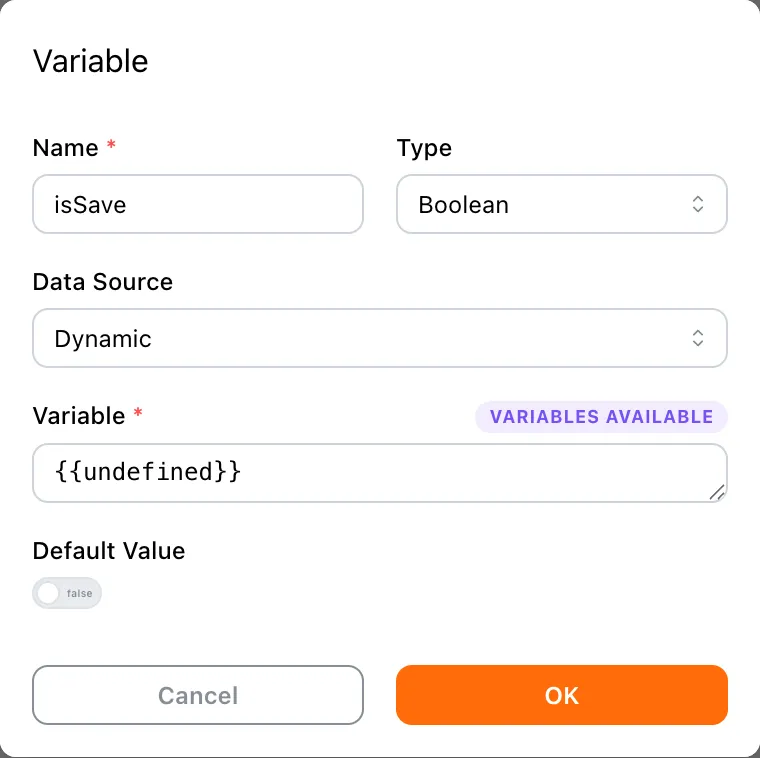
In some workflows, you may need to clear a variable first, use Wait Until to wait for it to be assigned a new value, and then continue with the next operation.
To clear a variable, set its data source to Dynamic and use {{undefined}} or {{null}} as the value.
Improved rendering for different data types
We've improved how different data types are rendered throughout the editor, making values easier to read and distinguish at a glance.
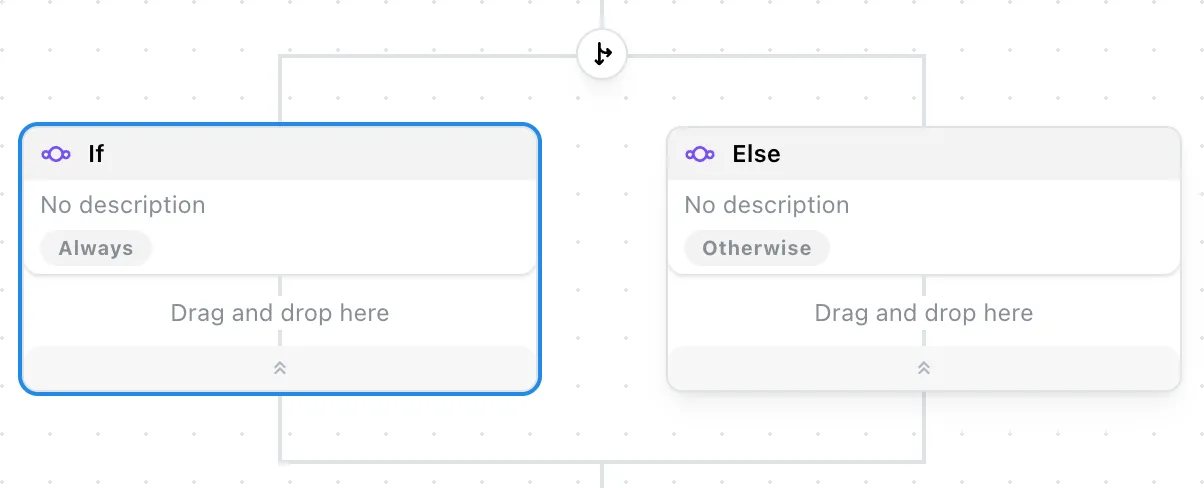
Condition now supports Else
Condition now supports an Else branch, making it easier to define alternative paths when a condition isn't met.
Select Option now supports multiple selections
Select Option can now select multiple options at once, adding support for multi-select elements.
Fixed an issue where Finder couldn't select elements in Pinterest modals
Fixed an issue on Pinterest where Finder could fail to select elements inside modal dialogs.
Finder can now correctly detect and select these elements without being blocked by the modal's page structure.
Fixed Inspector display issues in iframes
Fixed an issue where moving the cursor back and forth between the main page and one or more iframes could cause Inspector states to interfere with each other, resulting in incorrect display behavior.
Breaking changes
To support the continued evolution of Tapicker, we've made several breaking changes in this release. We've done our best to maintain compatibility, but if you encounter any issues after upgrading, please check the following changes:
- The
jsondata type has been renamed toobjectin Set Arguments, Set Variables, and Extract Data json:fileandjson:urlin Set Arguments have been renamed toobject:fileandobject:url- In Wait Until, the
loadedoption for theelementtype has been renamed toappeared, whileloadedfor thevariabletype has been renamed toassigned - Condition is now a container block and supports nested If / Else blocks
- The Loop type
numberhas been renamed torange, andconcurrencyCounthas been renamed tocount - The
loopfield in Break and Continue has been renamed totarget - The
bottomtype in Scroll Page has been renamed toboundary isCheckedin Tick Checkbox has been replaced withaction: check | uncheck- Return is no longer restricted by the scope of New Tab